Generation comparison
DUI Professional Gen 3 moves from static BAC calculation to documented timeline modeling.
The latest workflow keeps the familiar Widmark baseline but adds per-drink timing, optional forensic and research model comparison, model overlays, richer chart controls, and PDF report annotations that preserve assumptions instead of hiding them.
Subscription access
Gen 3 separates core simulation from Expert model access.
Standard subscriptions include the Widmark baseline, ASB forensic range, delayed absorption, timing model, Watson Total Body Water, advanced chart controls, and professional PDF report output. DUI Pro Expert is required for full Michaelis-Menten, Norberg-informed PK, and PBPK approximation model output. Standard subscribers can preview those research models with an EXPERT DEMO watermark.
Gen 1
DUI Pro Classic
Static BAC calculation and basic report generation for early professional timeline review.
- Widmark-centered calculation workflow
- Predefined drink references and custom entries
- PDF report output for the modeled scenario
Gen 2
DUI Professional Web Simulator
Modernized web workflow with saved profiles, dynamic BAC charts, keypoint review, and range visualization.
- Saved simulations with editable variables
- Dynamic lower, midpoint, and upper BAC curves
- Keypoint slider for event-time analysis
Gen 3
Current DUI Professional Platform
Timing distribution, optional model comparison, D3 chart controls, and report annotation appendices for transparent review.
- Drag-and-drop drink timing and per-drink duration
- Optional model overlays beyond Widmark
- Branded or austere PDF reports with model audit
Gen 3 feature set
The current simulator is built around timing, comparison, and transparent reporting.
Each item below explains what the feature adds to the BAC workflow.
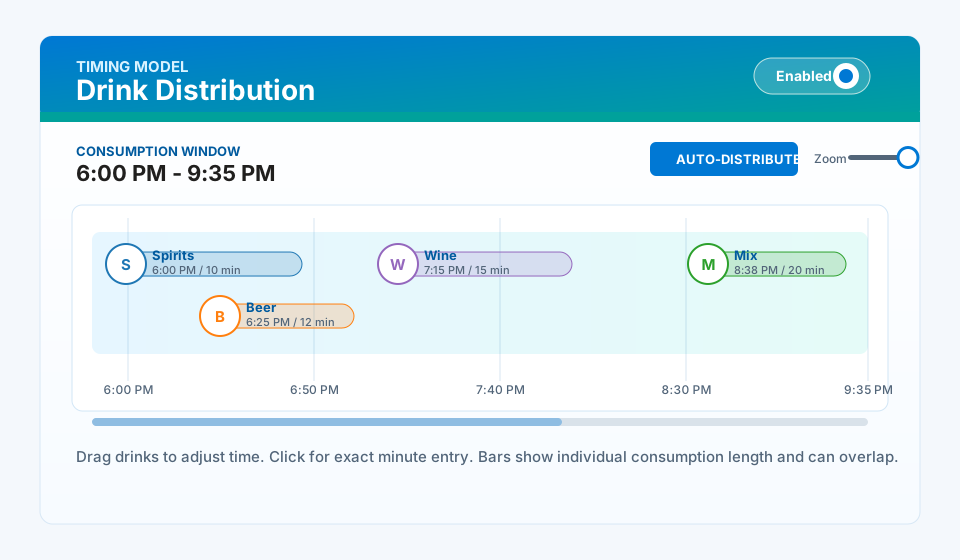
Build front-loaded, back-loaded, clustered, or overlapping drinking histories by assigning each drink a start time and duration.
- Supports exact minute entry and visual drag adjustment.
- Preserves individual timing assumptions for reporting.
- Keeps the consumption phase visible beside the BAC curve.
Gen 3 adds optional ASB-oriented range, Watson total body water, delayed absorption, and advanced research scenarios for qualified review.
- Optional models must be selected; existing Widmark behavior remains the baseline.
- Advanced models remain framed as expert-review scenarios.
- Missing required inputs produce warnings instead of silent output.
Overlay optional model curves on the current Widmark midpoint and range to see how assumptions change peak timing and keypoint values.
- Highlights sensitivity to distribution, absorption, and body-water assumptions.
- Supports lower, midpoint, and upper selected-model ranges.
- Keeps model labels visible on the chart and report.
Quick-add beverages can be dragged into the consumption window timeline so the drop position becomes the drink timing assumption.
- Supports visual placement with timeline feedback.
- Allows stacked drinks when a drinking period is intense.
- Auto-distribute can return the scenario to an even timing pattern.
Gen 3 chart controls support cleaner comparisons, display options, axis scaling, curve styles, model overlays, and difference-review workflows.
- Improves readability when several ranges or model lines are visible.
- Supports scale choices for longer elimination windows.
- Keeps peak, keypoint, lower, and upper values tied to the same visual timeline.
The timing details can show each drink's ethanol contribution in context with estimated elimination during that drink's consumption interval.
- Helps explain why a slow single drink may have little net accumulation.
- Makes each drink's timing, ABV, volume, and dose easier to review.
- Pairs visual drink icons with structured report output.
DUI Pro branded reports support polished professional review; Court Report styling keeps the output restrained for submission-oriented workflows.
- Both styles preserve chart, drink, subject, model, and keypoint information.
- Court Report styling avoids promotional presentation.
- Report language avoids court-approved or definitive-BAC claims.
The appendix can enumerate selected models, required inputs, parameter values, user overrides, warnings, citations, and keypoint outputs.
- Documents the calculation basis for later review.
- Separates measured facts from model assumptions.
- Preserves source basis without turning the output into legal or medical advice.
Capability matrix
Gen 1, Gen 2, and Gen 3 compared
The matrix is organized by practical workflow capability rather than by implementation detail.
| Workflow capability | Gen 1 Classic calculator |
Gen 2 Web simulator |
Gen 3 Current platform |
|---|---|---|---|
| Primary calculation model How the simulator frames the main BAC calculation. | Widmark | Widmark with ranges | Widmark plus optional comparison models |
| Drink database and custom drinks How drink dose is entered and documented. | Reference drinks | Public and private profiles | Profiles, quick-add cards, private drink manager |
| Drink timing How the drinking pattern is placed on the timeline. | Start/stop window | Even distribution window | Per-drink drag, drop, start time, and duration |
| Consumption Window timeline How users visually review drinking distribution. | Not available | Consumption phase shading | Interactive distribution timeline with stacking and zoom |
| Additional models beyond Widmark Whether optional non-Widmark model views are available. | Not available | Not available | ASB range, Watson TBW, delayed absorption, research models |
| Model overlay comparison Whether selected models can be compared to the Widmark baseline. | Not available | Not available | Selected model overlay with range fill |
| Chart configuration How much control users have over the BAC chart. | Static report graph | Dynamic chart with keypoint controls | Advanced display, scale, curve, and comparison options |
| Per-drink timing details How individual drinks are explained in output. | Not available | Drink list and totals | Structured timing details with net consumption context |
| Report styles How PDF output can be presented. | Single PDF style | DUI Pro report style | DUI Pro branded or austere Court Report style |
| Model annotation appendix Whether reports explain model inputs and parameters. | Not available | Core assumptions in narrative | Detailed appendix with assumptions, parameters, warnings, and sources |
| Saved simulation workflow Whether users can revisit a scenario later. | Not available | Saved scenario profiles | Saved profiles with model selections and timing metadata |
| Professional positioning How the tool avoids overstating modeled output. | Calculation output | Range-aware reporting | Assumption-dependent model audit and caution language |
How Gen 3 changes the workflow
From drink facts to a reportable assumption audit
Gen 3 is designed to show how a modeled BAC result was produced, not just the final curve.
Enter drink facts
Select public profiles, custom drinks, partial servings, ABV, and volume instead of relying on shorthand drink labels.
Place drinks on the timeline
Drag drinks into the Consumption Window, stack them when needed, and set exact start times and durations.
Choose the calculation view
Keep Widmark as the default or add optional comparison models when the facts and review purpose justify them.
Review chart behavior
Compare peaks, keypoint values, model overlays, range fills, and scale choices in the D3 chart surface.
Export with assumptions
Generate branded or Court Report style PDFs with the model annotation appendix and input audit.
Report output
Two report styles, one assumption record.
Users can choose DUI Pro branded PDF styling for professional review or a more austere Court Report style when a less thematic report package is appropriate. In either style, Gen 3 can include the BAC Model Annotation Appendix with selected models, warnings, input values, parameter overrides, and literature basis.